Software  |  Pocket PC Version  |  Online Documentation  |  Knowledge Base Contact

Purchase

A. Purchase a New License 

  • If you are not a registered owner of Four Winds version 1.x, you must buy a new license. On the other hand, if you do have a registered version of Four Winds 1.x (any version starting with 1), you are entitled to an upgrade at a reduced price (see section B below). 
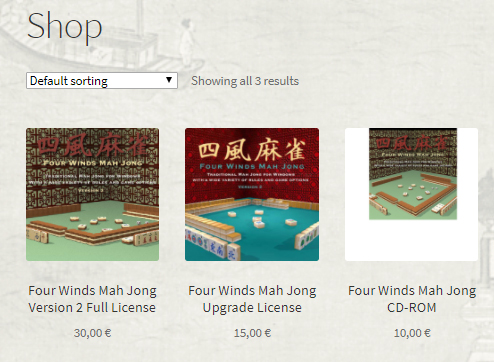
  • The fastest method to purchase a new license is to make an order at the price of  EUR 30 (about USD 36 – for an exact exchange rate, use the universal currency converter) by using our own secure server ordering system. By using our own ordering system you will get the registration number immediately (at the same time you make your order).  Currently only VISA and MasterCard/Eurocard credit cards are supported in our online ordering system.

     
    To buy a new license, click the picture on the left.

  • You can also purchase a license by making a PayPal payment worth EUR 30. You will receive the registration number to your PayPal email address normally within 24 hours. Please remember to fill out and send the order form if you wish to register the game to some other name than the one that appears on your PayPal account.


    – Fill out a  PDF format order form (requires Adobe Acrobat 4.0 or later. If you do not have it download it from Adobe by clicking the button below).
    Get free Adobe Acrobat from Adobe's site

    – Fill out a Word 6.0 format order form (opens also with WordPad that comes with your operating system).

  • As an alternative to an online order, you can purchase a license by making a Foreign Payment Order, i.e., a deposit worth EUR 30 to Lagarto’s bank account: Sampo Bank FI0980001270864920 Swift code: DABAFIHH. Please remember to  fill out an order form (see below) and fax it to +358-9-759 40 400 or send it by e-mail to the address mentioned in the order form.  
    Note: Foreign payment orders made from a) a country not belonging to the European Union  or b) from an EU country in currency other than Euro, should be made so that all expenses are covered by the payer (the banking costs for making and cashing this kind of a payment might exceed the price of the registration so if we accept a payment that does not cover the receiver's costs we might actually need to pay for selling a registration license...). Check carefully the banking costs before making the deposit!  
    If you live in the United States and cannot pay with a credit card, it is recommended that you use RegSoft's services as they can accept U.S. money orders and checks (note though that RegSoft cannot handle CD-ROM or upgrade orders). 
    We, too, can accept a typewritten checks (please do NOT write in hand as our bank sends hand written checks bank to your bank for verification and this costs at least EUR 45), made payable to Lagarto. Please assign the sum in your local currency, and add a sum worth EUR 13 for expenses.
    – Fill out a  PDF format order form (requires Adobe Acrobat 4.0 or later. If you do not have it download it from Adobe by clicking the button below).
    Get free Adobe Acrobat from Adobe's site

    – Fill out a Word format order form.
  • If you have a credit card other than VISA/MasterCard/EuroCard and wish to to make an online order, or if you wish to pay with a check or place your order via telephone, you can purchase a new license for Four Winds 2.0 also by using RegSoft's online ordering system. The price of the registration is USD 30 and you will receive the registration number within a few hour’s delay (a maximum of 24 hours, depending on the time zone difference).

    To buy a new license at RegSoft, click the picture on the left.

  • Four Winds 2.0 on a CD-ROM. You can now order the complete game – along with all themes and the tutorial – also on a CD-ROM. The CD-ROM is available only as an add-on product for registered users. To order, simply check the appropriate check box in the order form when you purchase the full license of the game. The cost of the CD-ROM is EUR 10 + shipping (EUR 2.50 to European countries, EUR 4.50 to rest of the world). 
    Note: If you already have registered your copy of Four Winds 2.0 but wish to have the game on a CD-ROM, you can make a separate CD-ROM only order.
    Note: The CD-ROM contains exactly the same version of the software as can be downloaded free of charge from this web site. You must still use your registration code to activate all features of the program. The point of purchasing a CD-ROM is in having a backup copy of the software and avoiding large downloads (the mere download size of the complete program with all themes and tile sets, along with the tutorial and Theme Editor, is well over 20 MB, and additional downloads may be needed in order to have an up-to-date installation engine and DirectX). 

B. Purchase an Upgrade License

  • If you are a registered owner of Four Winds desktop version 1.x, you are eligible to an upgrade license at a reduced price.
  • The fastest method to upgrade is to make an order at the price of  EUR 15 (about USD 18, for an exact exchange rate, check the universal currency converter) by using our online ordering system. This way will get the registration number immediately, at the same time you make your order. Currently only VISA and MasterCard/Eurocard credit cards are supported.

    To buy an upgrade license, click the picture on the left.


  • As an alternative to an online order, you can purchase a license by making a Foreign Payment Order, i.e., a deposit worth EUR 15 to Lagarto’s bank account: Sampo Bank FI0980001270864920 Swift code: DABAFIHH. Please remember to  fill out an order form (see below) and fax it to +358-9-759 40 400 or send it by e-mail to the address mentioned in the order form.  
    Note: Foreign payment orders made from a) a country not belonging to the European Union  or b) from an EU country in currency other than Euro, should be made so that all expenses are covered by the payer (the banking costs for making and cashing this kind of a payment might exceed the price of the registration so if we accept a payment that does not cover the receiver's costs we might actually need to pay for selling a registration license...). Check carefully the banking costs before making the deposit!  
    We, too, can accept a typewritten checks (please do NOT write in hand as our bank sends hand written checks bank to your bank for verification and this costs at least EUR 45), made payable to Lagarto. Please assign the sum in your local currency, and add a sum worth EUR 13 for expenses.
    – Fill out a  PDF format order form (requires Adobe Acrobat  4.0 or later;
    if you do not have it download it from Adobe by clicking the button below).
    Get free Adobe Acrobat from Adobe's site

    – Fill out a Word format order form.
  • Four Winds 2.0 on a CD-ROM. You can now order the complete game – along with all themes and the tutorial – also on a CD-ROM. The CD-ROM is available only as an add-on product for registered users. To order, simply check the appropriate check box in the order form when you purchase the upgrade license of the game. The cost of the CD-ROM is EUR 10 + shipping (EUR 2.50 to European countries, EUR 4.50 to rest of the world).
    Note: If you already have registered your copy of Four Winds 2.0 but wish to have the game on a CD-ROM, you can make a separate CD-ROM only order.
    Note: The CD-ROM contains exactly the same version of the software as can be downloaded free of charge from this web site. You must still use your registration code to activate all features of the program. The point of purchasing a CD-ROM is in having a backup copy of the software and avoiding large downloads (the mere download size of the complete program with all themes and tile sets, along with the tutorial and Theme Editor, is well over 20 MB, and additional downloads may be needed in order to have an up-to-date installation engine and DirectX.) 

C. Purchase the CD only (for users who already have the license)

  • If you already have registered your copy of Four  Winds Mah Jong 2.0 but wish to have the game on a CD-ROM, you can make a separate CD-ROM only order. (If you have not registered and wish to have the game on a CD-ROM, use the regular order forms above and click the check box for the CD-ROM delivery when you make the order.) 
  • The fastest method to purchase the CD-ROM is to make an order at the price of  EUR 10 + shipping (EUR 2.50 to European countries, EUR 4.50 to rest of the world) by using our online ordering system. Currently only VISA and MasterCard/Eurocard credit cards are supported. (Note: One euro is currently about 1.2 U.S. dollars, for an exact exchange rate, check the universal currency converter.) 

    To make a  CD-ROM-only order, click the picture on the left.


    As an alternative to an online order, you can purchase a license by making a Foreign Payment Order, i.e., a deposit worth EUR 10 (+ 2.50 or 4.50 for shipping) to Lagarto’s bank account: Sampo Bank FI0980001270864920 Swift code: DABAFIHH. Please remember to  fill out an order form (see below) and fax it to +358-9-759 40 400 or send it by e-mail to the address mentioned in the order form.

    – Fill out a  PDF format order form (requires Adobe Acrobat  4.0 or later;
    if you do not have it download it from Adobe by clicking the button below).
    Get free Adobe Acrobat from Adobe's site

    – Fill out a Word format order form.
  • Note: The CD-ROM contains exactly the same version of the software as can be downloaded free of charge from this web site. You must still use your registration code to activate all features of the program. The point of purchasing a CD-ROM is in having a backup copy of the software and avoiding large downloads (the mere download size of the complete program with all themes and tile sets, along with the tutorial and Theme Editor, is well over 20 MB, and additional downloads may be needed in order to have an up-to-date installation engine and DirectX). 

NOTE:  Disregarding the method of ordering the registration information will be e-mailed to you (or if you do not have an e-mail address, sent by postal mail). With the registration information you can enable all the features in your existing copy of Four Winds 2.x version by using the Register command on the Help menu. If you have not downloaded yet Four Winds 2.x, you can do if from here. If your currently installed version is earlier than 2.02, you can download the latest version from the Updates page

© 2002–2010 Lagarto. All rights reserved. Top