|




|
 Introduction – Welcome
Welcome to Four Winds Mah Jong – the most versatile game of Mah Jong in
the world!
In short
- Get the latest desktop version 2.24
-
 This
patch (created on August 20, 2026) fixes errors found in
earlier 2.x versions of the game. The current version is also fully
compatible with Windows 8.1, 10 (excluding Windows 10 S), and 11.
If you are a registered user, you can download the
latest version here. To see the
details of the update, please check the version history. This
patch (created on August 20, 2026) fixes errors found in
earlier 2.x versions of the game. The current version is also fully
compatible with Windows 8.1, 10 (excluding Windows 10 S), and 11.
If you are a registered user, you can download the
latest version here. To see the
details of the update, please check the version history.
- The latest versions support modern laptop and large desktop
display sizes and wide screens, up to 1920x1200 pixels, and introduce
a new bigger tile size. Ultra high resolution displays (and specifically 3:2 display ratios used on Surface Pro, Surface Book and Surface laptops) are supported by allowing Windows 8, 10 and 11 to perform app scaling. Four Winds also supports color management so
the graphics won't look overly saturated on modern wide-gamut LED-backlit
displays.
- Square board layouts (where players sit around the four sides of
the Wall) are supported on most screen resolutions.
- Latest versions support transparent tile
sets allowing Akagi-style games, and addition of EMA Riichi rule
preset, and addition of four new (scanned) tile sets.
- Theme Editor is also available for creating themes
supporting HD graphics.

High-resolution boards use larger
tile size,
up to 50 x 64 pixels.
- Use CrossOver to run Four Winds smoothly on Linux or macOS, including Sequoia
and new macs using Apple Silicon (M1/M2/M3/M4) chips.
>> More...
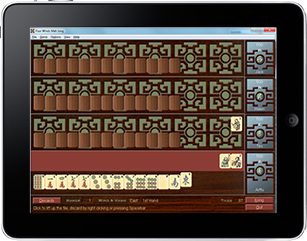
- Or use the free Whisky App to achieve pretty much identical and easily
configured
Wine environment on modern Macs to run Four Winds
(also supports background music).
- You can run Four Winds also on an Android device using Windows emulators
like Winlator (optimized for Snapdragon devices) or ExaGear (for ARM-
based devices).
>> More...
- Use Microsoft Remote Desktop (currrently updated to Windows App)
or Splashtop
Personal to run Four Winds on other operating systems like Android, Chrome, Linux, iOS, macOS, and Windows 8 RT! You actually
just stream the game via LAN (or fast Internet connection) from your Windows PC, but can play it as if it ran natively on your non-Windows device – an ideal solution especially if you have a small portable Windows box like Intel NUC, or a Windows laptop! All features of the game are available, including the
multiplayer games.
>> More...
- Four Winds for Windows Mobile (free)
-
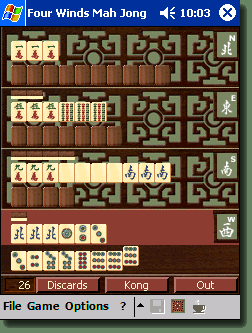 Four
Winds is also available for Windows Mobile, supporting Pocket PC 2002 and 2003
devices, and Windows Mobile 5 and 6 QVGA devices with 240x320
screens or VGA devices with 480x640 screens (square screens and
landscape screens are not supported). Four
Winds is also available for Windows Mobile, supporting Pocket PC 2002 and 2003
devices, and Windows Mobile 5 and 6 QVGA devices with 240x320
screens or VGA devices with 480x640 screens (square screens and
landscape screens are not supported).
- More information about the Windows Mobile version on our
Pocket
PC site.
- Four Winds 2 (full version) comes with 12
themes and several alternative tile sets, and the program also
supports user-defined themes and tile sets.
- For thumbnails, descriptions and further information, check the
Themes
and Tile sets
sections under the Features.
- You can download a free Theme Editor
to facilitate creation of your own themes. You still need a bitmap
editor to create most of the images, but with Theme Editor you can
specify colors for controls and other elements using solid colors,
and create the final bitmap in a format required by Four Winds.
- You can now play .mp3 files (and any other sound format
supported by DirectX) as background music.
- Do you have a unique tile set and a scanner? If so – and you
wish to use your tile set in Four Winds and share the tile set
with other users – please contact
us for instructions.
- The latest version of Four Winds 1.x –
version 1.14 – is available free of charge to registered users of
version 2.
- Four Winds version 1.x is no longer for sale, but 1.x version
files (the actual program, language modules, tutorial, etc.) are
still available on our site to support our existing customers. The version
– 1.14 – also accepts the registration number of version 2, so the
registered users of version 2 can also benefit from
features specific to version 1.x: e.g., the small size and
availability of language modules.
- Version 1.14 is binary compatible with the Windows Mobile version so you can use the program to play games interchangeably with your
PC and Windows Mobile.
- Four Winds 1.x versions now also speak Russian! The Russian
language module is available on our version 1.x
download
page.
|
|


